Illustrating process and HTML
- Apr 19, 2024
- 2 min read
Updated: May 28, 2024
Week 5 - Session 2
Here is my suite of 9 graphic icons after putting them on an HTML layout in Visual Studio Code. I started with writing the basic structure, adding images, changing the background colour, adding sounds based on mouse movements and finally backing to resize images and adjust the display.

It took time to pay attention to each file name and ensure every name listed in the code in Visual Studio Code are the same in the Root File. Otherwise, it wouldn't work.
Process on Adobe Illustrator
01. Combine objects
Besides Pentool I used the most, I also took advantage of the tools in Pathfinder panel to optimise the process on Adobe Illustrator. To create some objects that have curves and the Pentool may require meticulousness, I used Minus front and the desired elements were created quickly just from basic shapes like ovals or squares.


To create some simple objects more effectively, I used Unite and Intersect. I've done this with almost the hair part of each feature and detailed elements such as cup brim, shades, pills, fruits, etc. which could made from two basic shapes. A quick reminder for me was to duplicate the initial shape so that after using the tool, I still had the object base to place the newly created object into it.


02. Clipping mask
I used Clipping masking in some cases.
For example, I'd like to create a jigsaw puzzle shape in every icon so this tool worked well, especially when there were lots of details within the icons. It took me quite a long time to clearly imagine how the final element could be created so that I knew what to do first and next.
Firstly, I created a new square on top of everything but under a missing circular shape and used Minus front to have the jigsaw puzzle shape. Then, I dragged a whole selection of the new shape on top and all the remaining elements in the back and clicked Make Clipping Mask. The desired icon was finally made.


03. Colour Design
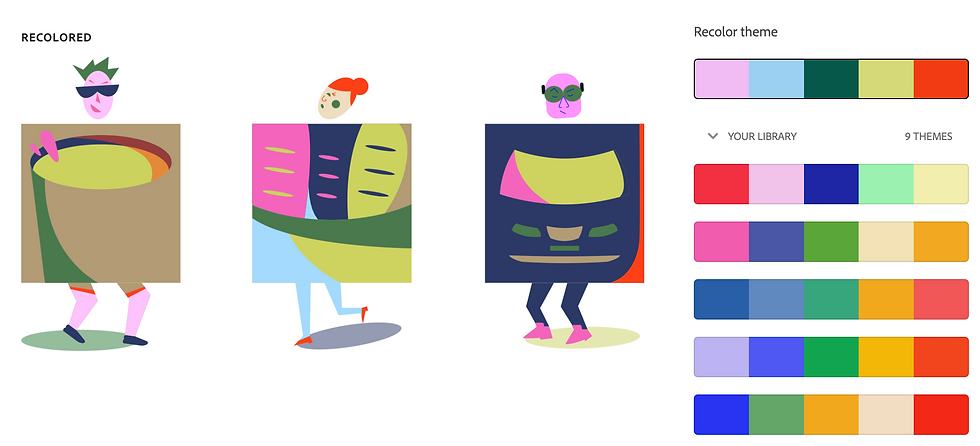
Before having an appropriate colour palette, I'd tried different colour designs generated on Adobe Color to have a look closer at my design and experience which one worked and which one didn't. Some of them were too chaotic while some of them were too boring.


Comments